
Java Can't Scale to Zero? This Quarkus App Says Otherwise.
A solo session building a family travel-budget tracker with Quarkus, Qute, and Firestore, deployed to Google Cloud Run and confirmed at $0 in the billing dashboard twice. Zero cost held up, and Google's own login setup caused more trouble than the app code did.
YouTube
Java Can't Scale to Zero? This Quarkus App Says Otherwise.
Load YouTube video
This video is embedded from YouTube and will only be loaded after your consent. When loading it, personal data may be transmitted to YouTube or Google and cookies may be set.
More details are available in the privacy policy.
Project Source
Working Repository
Explore prompts, instructions, and examples used in the live modernization workflow.
Open repositorySession Timeline
- 00:00Introduction
- 01:22Why a zero-cost budget tracker: the family vacation story
- 04:21The plan: build and deploy entirely with AI
- 05:52GCP project setup and the zero-cost goal
- 07:58Feeding the build prompt to GitHub Copilot
- 34:52First local run attempt and Firestore credential errors
- 50:27App running locally: family members, budgets, and layout fixes
- 53:51Telling AI to provision GCP infra and CI/CD
- 1:04:04Code walkthrough: records and Firestore repository structure
- 1:11:01GitHub Actions workflow and first Cloud Run deployment
- 1:18:52Live app test and confirming zero billing cost
- 1:28:22Adding Google login: Copilot struggles and IDE crashes
- 1:41:14Switching to Claude Code for the OAuth implementation
- 1:44:19OAuth client setup and GitHub secrets
- 1:52:45Debugging OIDC config errors and credential mismatches
- 2:14:21Login finally works: multi-user test with viewers
- 2:17:11Measuring cold-start boot time
- 2:21:12Wrap-up and closing
A family vacation in England the week before this session started it. My kids wanted to buy things and had no idea what budget they had left. I tracked it on a to-do app, which worked but was a mess. I'm also cheap about my own side projects: I won't pay to host something just for myself, but I want it reachable from anywhere, for family and friends, at no cost.
So this session had three rules. Build with an AI coding tool, not by hand. Get it running locally first. And do the entire cloud setup, project, OAuth client, Cloud Run deployment, through the AI too, not the GCP console or memorized gcloud commands.
Here's the shape of it end to end:
The stack, picked for cost, not habit
Every choice here kept the running cost at zero. The build stayed on Quarkus's plain JVM path, no native image: native builds fight reflection, and the Google Cloud client libraries this project needs lean on reflection heavily. Time and time again I try to build a native image and it never really works. My usual Quarkus cold start elsewhere is under two seconds, so that became the target on the JVM instead.
Qute won over Vaadin for the UI. I prefer Vaadin by hand, but pairing it with AI tools has burned me before: licensing issues, missing annotations the AI didn't catch. With AI I right now cannot recommend it. Qute sits close enough to plain HTML that the AI generates it reliably.
Firestore over a SQL database is the decision that makes "zero cost while idle" true: a SQL instance bills while running, idle or not, and Firestore doesn't. Google login rode on top of that, through Quarkus's own quarkus-oidc extension with provider=google: no separate library, no custom credential handling.
None of this was rehearsed. I had never used Grok 4.6 before this stream, the model GitHub Copilot ran in autopilot mode, and I'd never seriously used Google Cloud either.
The app came together fast. The login didn't.
The first local run failed on Firestore credential errors: no Application Default Credentials configured locally. The fix was simple: switch local development to an in-memory store, no Docker, no real credentials needed. The data model needed a fix too. Budgets and expenses were shared across the whole family instead of per person, which didn't make sense at all once I tried using it. Each family member got their own envelope: budget, expenses, optional income, modeled as immutable Java records, close to event sourcing in shape.
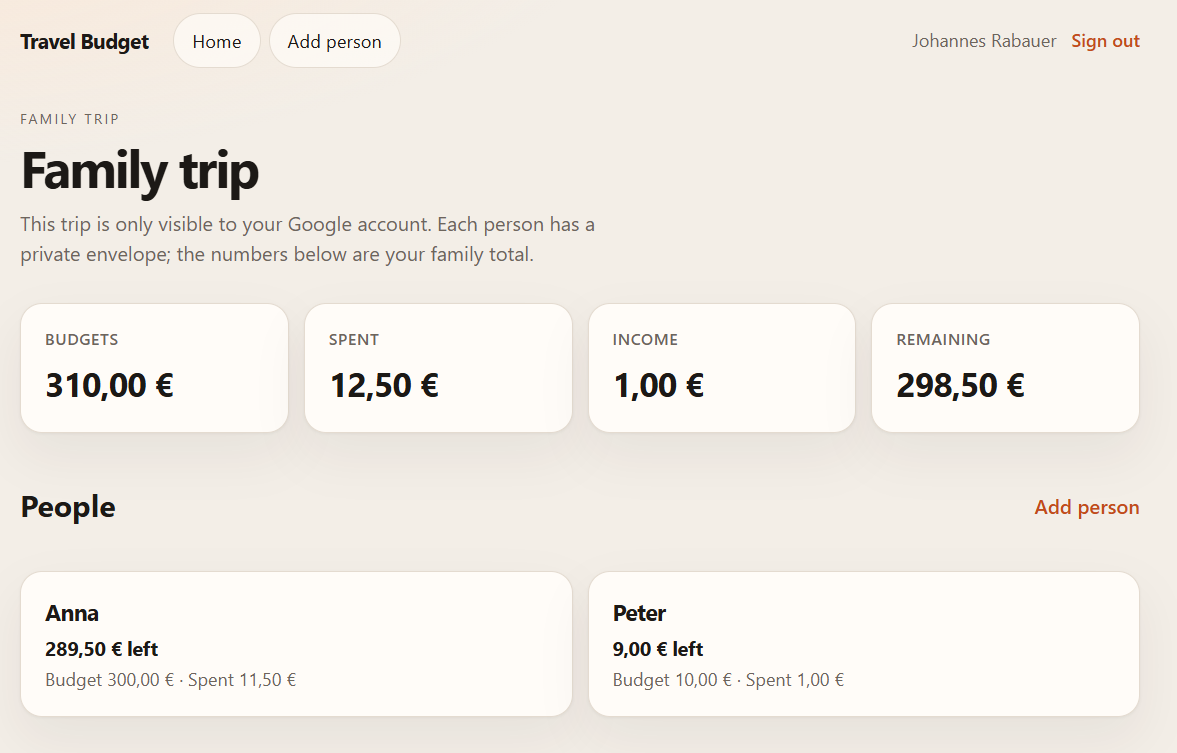 The family dashboard: one shared trip, one private envelope per person.
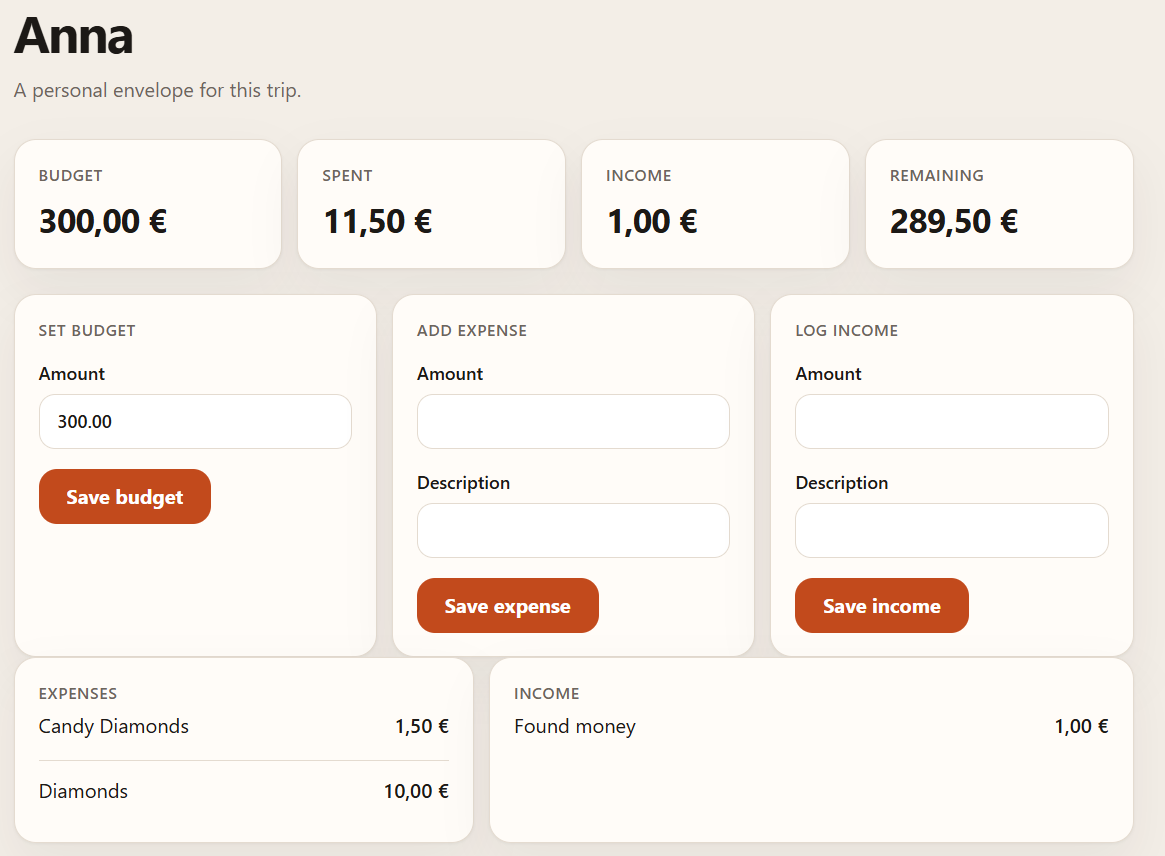 Anna's own envelope: budget, expenses, income, and what's left.
Provisioning the cloud side was one prompt: set up whatever Google Cloud needed, write a GitHub Actions workflow that deploys on every push to main. It built with Maven on Java 21 and deployed to Cloud Run in europe-west with CPU boost and --min-instances=0. First deployment worked. The billing dashboard for the trailing seven days read $0.
Google login is where the AI-does-everything approach broke. Copilot's browser-canvas view, meant to click through the Google Cloud console for me, kept dying mid-flow. It crashed hard enough once that I lost the whole Copilot session and had to log back in. I'm bit disappointed here, I said on stream, before giving it one last try and switching to Claude Code.
Claude Code couldn't create the OAuth client either, for a more honest reason: it's a manual step in the Google Cloud console, no API shortcut for an agent to take. So I did it myself, muting the stream twice to keep the client secret off camera, then had Claude store the values as GitHub secrets instead of typing them into the chat.
That's what the diagram above is about. Every other box in this project ran through a prompt. This one didn't, and that's exactly where the debugging happened. First, a deploy failed on an unadvertised OAuth "end session endpoint" I never got a clean fix for. Then sign-in worked but produced a "resource not found" error. Then a credential mismatch turned out to be a pasting artifact: I'd copied the client secret using Windows cmd instead of PowerShell, which left stray characters in the value. PowerShell fixed it, and sign-in worked end to end. Viewers, including "Suzan," "Sumi," and "Mr. SK," signed in with their own Google accounts and added their own data.
Billing read $0 again afterward. Honest gap: the data model still doesn't cleanly separate multiple independent families. It happened to work for everyone testing it live, but the family/trip identifier is still hardcoded in places I flagged myself during the code walkthrough.
The cold start missed my own target
Real prep went into this: AppCDS, the Firestore gRPC channel warmed on a background thread at startup, Cloud Run's CPU boost, all aimed at under two seconds. Forcing the instance down and back up live, I measured roughly six seconds, then five, then six, then four on a later attempt, worse than the test run I'd done the day before. I never found the cause. Cost held up perfectly; latency needs more work.
Final thought
The headline claim held: a Java app on Cloud Run can scale to zero and cost nothing while idle, checked twice on the actual billing page. What surprised me was where the AI-driven workflow broke. Not the infra, the deploy pipeline, or Firestore, all of that went through a prompt without drama, but the one step Google itself gates behind a manual click: OAuth client creation. That's exactly where the bugs piled up. Hand an AI agent your entire deployment, and budget for that one console tab anyway.
Useful links
- Quarkus OIDC guide: configuring
quarkus-oidcwith built-in providers like Google - Quarkus Google Cloud Services (Quarkiverse): the Firestore extension used for storage, including a local emulator Dev Service
- Cloud Run pricing: the Always Free tier this session stayed inside of
- The BMad Method for Java Developers: my usual AI-workflow toolkit, skipped here since it's too involved for a single-stream build
Comments
Load comments from GitHub optionally
The comment section is provided via Giscus and GitHub Discussions. It will only be loaded after your explicit consent. When loading it, personal data such as your IP address and technical metadata may be transmitted to GitHub, and cookies or similar technologies may be set.
Please confirm first before loading the comment section.