
Junie, IntelliJ, and Spec-Driven Development
with Anton ArhipovJunie refused to cooperate, but that turned out to be the best possible demo: switching to another agent mid-session was seamless, and Anton's spec-driven workflow proved its value regardless of which agent was running.

YouTube
Junie, IntelliJ, and Spec-Driven Development
Load YouTube video
This video is embedded from YouTube and will only be loaded after your consent. When loading it, personal data may be transmitted to YouTube or Google and cookies may be set.
More details are available in the privacy policy.
Project Source
Working Repository
Explore prompts, instructions, and examples used in the live modernization workflow.
Open repositorySession Timeline
- 00:00Introduction
- 07:05Look at a pre-made MIDI application
- 35:00Starting with an empty repository
- 36:05Installing Anton's Skills
- 50:30Starting "specification"
- 01:05:30Move on with "criteria"
- 01:08:50Anton's take on Spec-Driven Development
- 01:20:30Trying Junie for the second time
- 01:24:00Navigating with Junie
- 01:28:55Move on to "rules"
- 01:34:40Move on to "spec-review"
- 02:02:15IntelliJ AI Features
- 02:08:47Analyzing the pre-made MIDI application
- 02:27:00"Running" application (but still fails)
- 02:30:00Conclusion
Anton Arhipov joined me to build a JavaFX MIDI visualizer inside IntelliJ, primarily using Junie, JetBrains' own AI agent. Junie had other plans and crashed repeatedly, so we switched to Claude and kept going. Turns out that was the most instructive part of the whole session.

When the Star Agent Refuses to Work
We wanted to demo Junie, the native IntelliJ AI agent, and it produced unknown exceptions from the start, on multiple models, on a fully up-to-date IntelliJ installation. We retried, switched models, restarted. Nothing helped.
What happened next was more useful than a smooth Junie demo would have been: we selected Claude agent in the same chat window, re-ran the exact same prompt, and continued without losing any context or changing any files. The agent skills Anton had installed were still there. The workflow was identical. The only thing that changed was the model provider.
This is the point Anton made explicitly, and it stuck: IntelliJ treats all agents equally. Junie is JetBrains' own agent, but it is not privileged in the platform. If it breaks, you pick another one and keep going.
Anton's Spec-Driven Workflow
Anton's agent skills define a staged pipeline for turning a vague idea into a working application. The stages run roughly in this order:
- spec -- takes your rough proposal (a markdown file with bullet points) and clarifies it through structured questions: what kind of visualization, which interaction model, what constraints apply
- criteria -- synthesizes the clarified requirements into numbered acceptance criteria (use cases by another name)
- rules -- establishes technical constraints: which libraries, which Java version, which patterns to follow
- spec-review -- cross-checks everything before implementation starts
- tasks -- generates a YAML-structured implementation plan broken into phases and individual tasks
- execute -- works through the task list phase by phase, checking off tasks and stopping at defined checkpoints for review
Each stage creates or updates a markdown file in a spec/ folder. The files stay in the repo and serve as a record of every decision made during planning.
What surprised me was his stance on what happens after implementation: throw the spec away, or archive it. The spec is not meant to be a living document kept in sync with the code. It is a function that transforms an empty project into a defined one. Once that transformation is done, it has served its purpose. If you want to add a feature, you write a new spec for that feature -- on top of the existing codebase, not as an update to the old one.
This is different from how I thought about specs. I would have kept everything and tried to maintain it as documentation. Anton's version is more pragmatic and probably easier to actually follow through on.
The YAML Task List
The tasks skill produces a structured YAML file before the agent writes a single line of code. It looks roughly like this:
tasks:
  feature: "MIDI Playback and Guitar Hero-Style Visualization"
  organizing_principle: "walking_skeleton"
  decisions:
    - id: dec-1
      decision: "Use a walking skeleton plan that reaches runnable file-load and playback flows before thickening visualization."
      reason: "The main delivery risk is integration across JavaFX, MIDI playback, and canvas rendering."
  phases:
    - id: phase-1
      name: "Scaffold runnable shell"
      tasks:
        - id: task-1.1
          name: "Create Maven and module skeleton"
          covers: [RULE-1, RULE-2, RULE-3]
          complexity: "M"
          validation: "Project builds and launches through Maven with the declared module path."
    - id: phase-2
      name: "Parse MIDI into domain data"
      ...
The full version lists every task with its acceptance criteria references, complexity estimate, and a concrete validation check. Before the execute skill runs, you review this file and confirm the plan. If the session is interrupted mid-phase, the agent picks up from the last incomplete task rather than starting over.
The execute skill then works through the phases in order, stopping at each checkpoint for a review before moving on. You stay in the loop at defined moments rather than approving every individual file write.
IntelliJ as an Agent Platform
Anton's framing of IntelliJ is useful: it is an agent platform, not a Junie product. The same MCP tools, the same IDE-native search (find usages, navigate to symbol), the same debugger integration -- these are exposed to any ACP-compatible agent. Junie happens to be built by JetBrains, but it has no special access.
One practical implication: the IDE's semantic search tools make agent context more accurate and cheaper. Instead of grep-style scanning, the agent can call "find usages" and get back the exact call graph. Less noise in the context window.
The /remote Command
A small Junie-specific feature worth knowing about: /remote starts a remote session that tunnels commands through your local machine while exposing a browser-accessible control panel. You walk away from the desk, the agent keeps running, and you confirm or redirect it from your phone. Useful for long runs where you want to stay loosely in the loop without sitting in front of the screen.
What We Did Not Finish During the Session
The MIDI visualizer did not reach a running state during the stream. The application compiled but the visualization was not working yet when we ran out of time.
Update: Finished After the Session
After the stream I ran the tasks and execute skills on the same repository with minimal additional prompting. The application reached a fully working state. Falling notes, audio playback, transport controls -- everything.
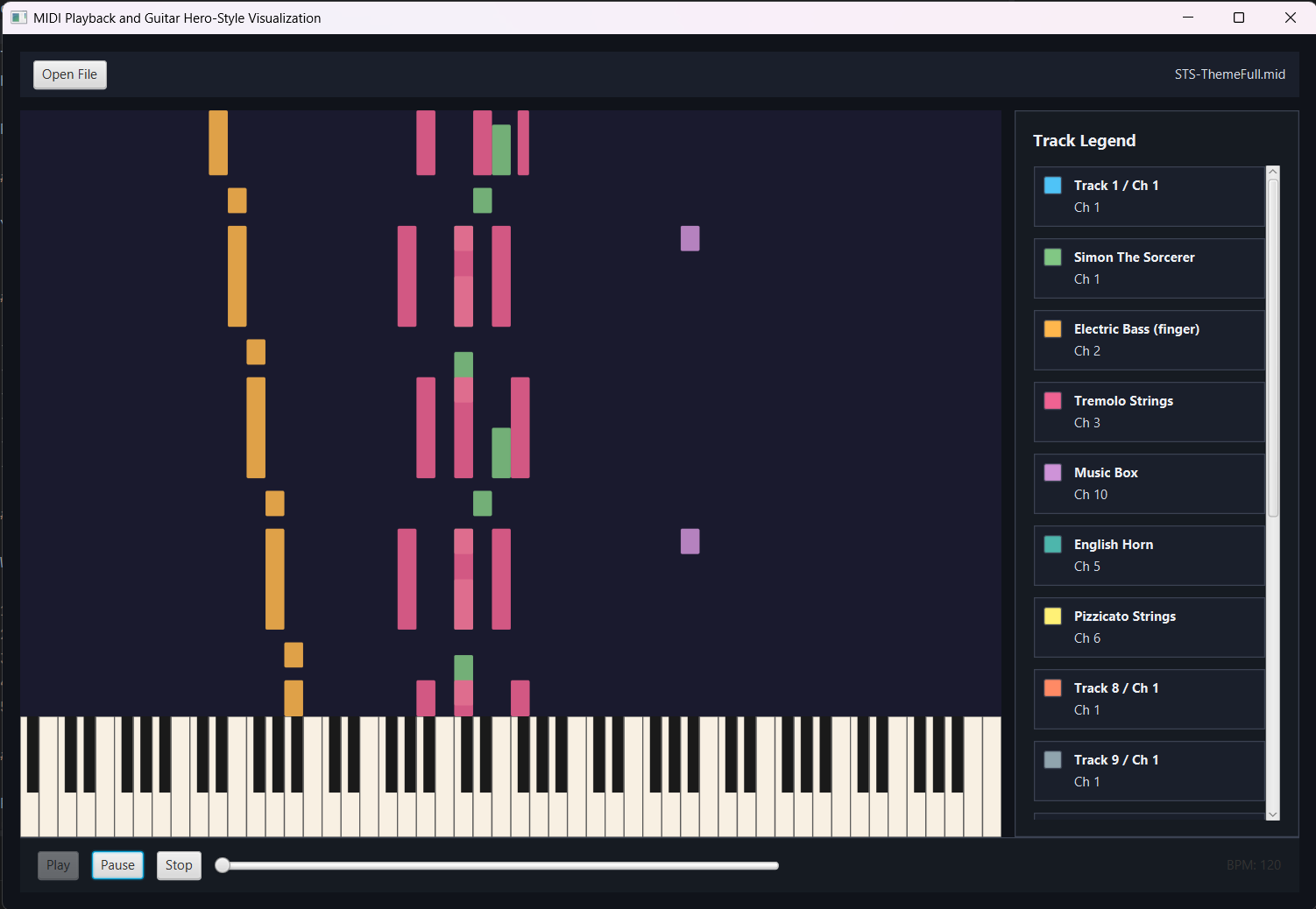
Anton's pre-built version was the reference throughout -- the repository is linked above if you want to see both.
Comments
Load comments from GitHub optionally
The comment section is provided via Giscus and GitHub Discussions. It will only be loaded after your explicit consent. When loading it, personal data such as your IP address and technical metadata may be transmitted to GitHub, and cookies or similar technologies may be set.
Please confirm first before loading the comment section.