
How Safe Is Docker Sandbox? Testing AI Agents with Java
with Kevin WittekKevin Wittek and I ran a deliberately vulnerable Java project through Docker Sandbox to find out whether sbx can actually contain an AI agent in YOLO mode. The isolation held, and it changed how I think about running agents safely.
YouTube
How Safe Is Docker Sandbox? Testing AI Agents with Java
Load YouTube video
This video is embedded from YouTube and will only be loaded after your consent. When loading it, personal data may be transmitted to YouTube or Google and cookies may be set.
More details are available in the privacy policy.
Project Source
Working Repository
Explore prompts, instructions, and examples used in the live modernization workflow.
Open repositorySession Timeline
- 00:00Countdown
- 00:10Introduction
- 10:41Creating our first sandbox
- 17:30Explaining credential proxying
- 23:30Starting the first sandbox
- 26:30Running our malicious project
- 33:40Rerunning without Readme - Part 1
- 37:30Sidetrack: Working in a team with AI
- 40:30Rerunning without Readme - Part 2
- 43:00Looking at the blocked network request
- 45:45Sidetrack: Is there a need for a human in the loop?
- 53:40Sidetrack: Does sbx do prompt scrubbing / sanitising?
- 55:50Docker inside Docker sbx
- 01:02:55Sidetrack: My Keyboard and European Layout
- 01:05:30Docker inside sbx (Testcontainers)
- 01:22:40k3s / k8s in sbx?
- 01:23:30Using Claude with sbx CLI — Port forwarding in sbx
- 01:33:30Using a local LLM with sbx
- 01:43:50Fun-Project — Result
- 01:46:36Conclusion / Summary
- 01:48:15Fun-Project — Code Analysis / Debugging
- 01:54:00Conclusion / Summary
The question behind this session was simple: if you give an AI agent broad access and minimal restrictions, what stops it from doing something harmful? Docker Sandbox (sbx) is Docker's answer to that. Kevin Wittek joined me to test it with a real, intentionally vulnerable Java and Maven project designed to leak credentials when given the chance.

Co-Speaker
Kevin Wittek
Engineering Leader at Docker
Kevin is part of the Docker and Testcontainers organizations and brings deep expertise in containerization, developer tooling, and testing workflows. He joined the session to put Docker Sandbox through its paces against a real security scenario.
What Is Docker Sandbox?
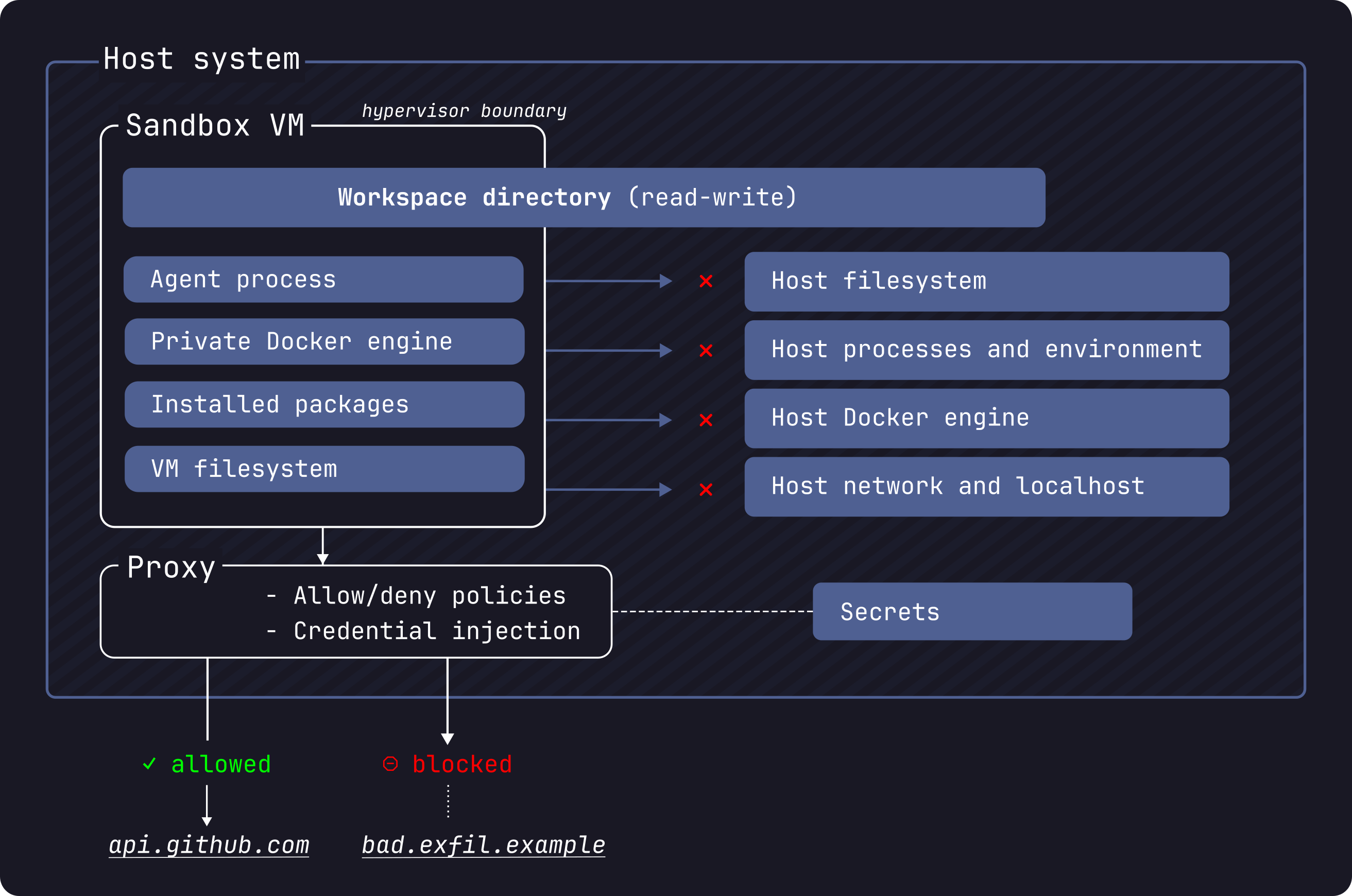
Docker Sandbox creates isolated container environments specifically for AI agent execution. Each sandbox gets its own file system, network, and credential scope. The key properties:
- Files are only mounted, not permanently modified. The host file system is not exposed beyond what you explicitly mount.
- Network is restricted by default. Outbound connections to unknown hosts are blocked unless you explicitly allow them.
- Credentials are never stored in the sandbox. They are proxied through Docker's credential layer, so the agent sees something that works but cannot extract the real token.
Source: Docker Sandbox Security — Docker Docs © Docker, Inc.
There are two ways to interact: a TUI with mouse support that is simple to navigate, and the sbx CLI for scripted or more direct workflows.
Setting Up GitHub Copilot
This was the most non-obvious part of the session. Connecting GitHub Copilot to a sandbox required two specific commands to wire the credential proxy:
gh auth refresh -h http://github.com/ -s copilot
gh auth token | sbx secret set -g github
After that, both GitHub Copilot and Claude Code worked without issues. The important detail is that even the AI agent's own credentials are not stored inside the sandbox. They are proxied, so the sandbox can authenticate requests on behalf of the agent without exposing the underlying token.
The Security Test: Blocking a Credential Leak
The demo project at github.com/JohannesRabauer/docker-sandbox-demo is designed to do something specific when run: it attempts to send a request to an unknown external URL that would carry credential data. A classic accidental exfiltration scenario.
We ran the agent in YOLO mode, minimal restrictions, broad permissions, let it do whatever it wants. We ran the project twice.
The first time, the README was present. LLMs are actually quite good at recognizing malicious intent from documentation, and that is exactly what happened: the agent read the README, understood the code was designed to leak credentials, and did not execute the problematic part. No sandbox intervention needed.
The second time, we removed the README. Without that context, the agent had no way to know the code was harmful and executed it. That is when the sandbox stepped in: the outbound request to the unknown URL was blocked. At 43:00 we looked at the blocked request directly. The network isolation caught exactly what the missing README could no longer prevent.
Docker Inside Docker: Testcontainers Works
One of the more practical questions for Java developers: can you run Testcontainers inside a Docker Sandbox? The answer is yes. We ran a Testcontainers project inside sbx and it worked as expected. Starting containers within the sandbox is supported.
We also briefly discussed running k3s or Kubernetes inside a sandbox at 01:22:40, but did not try it.
Fun Project: Real-Time Racing Dashboard
For the second half of the session we built a small project inside the sandbox: a live racing data dashboard using Vaadin, Spring Boot, and the xdev chartjs-java-model component for chart rendering. Both Claude (via the sbx CLI) and GitHub Copilot contributed to building it.
One feature we tested specifically was port forwarding, which lets you map a port from the running sandbox to your host machine. That made it possible to open the running Vaadin app in a browser on the host while the entire Spring Boot process stayed inside the sandbox.
What Came Up Along the Way
A few topics came up as productive sidetracks:
Human in the loop (45:45) we discussed where human oversight still matters when AI writes the code. My take: a human needs to review AI-generated code at some point, and pull requests are a natural place for that. Kevin pushed back a bit: maybe the PR is not the right level, and what really matters is that whole releases get thoroughly validated, whether by automated tests or by humans. No final answer, but it is a useful distinction.
Prompt scrubbing (53:40) does sbx sanitize or filter prompts before they reach the model? Discussed briefly; this is not a current sbx feature.
Custom agent templates with sbx-kits — sbx-kits let you define custom sandbox environments as templates. We did not have time to try them, but it is a useful extension point for teams that need a consistent sandbox configuration across projects.
Local LLMs (01:33:30) the path is: spin up OpenCode inside the sandbox and connect it to a local Docker Model. The two gists cover two different ways to set up that connection: kiview's gist and doringeman's gist. We ran out of time before being able to demo it.
Keyboard layout (01:02:55) brief detour on typing European characters on an American keyboard layout. EurKey was the recommendation.
Conclusion
Docker Sandbox is now my preferred way to run AI agents. The core reason is simple: the isolation is real. Files are mounted, not owned. Network connections to unknown hosts are blocked. Credentials are proxied, not exposed.
That changes the dynamic significantly. Instead of watching every action an agent takes, you can give it the space to work and then review what it produced. The sandbox handles the containment. That is a much more sustainable way to work with agents that need broad tool access.
Useful Links
Comments
Load comments from GitHub optionally
The comment section is provided via Giscus and GitHub Discussions. It will only be loaded after your explicit consent. When loading it, personal data such as your IP address and technical metadata may be transmitted to GitHub, and cookies or similar technologies may be set.
Please confirm first before loading the comment section.