
Three Coding Agents, One Java Project. Take a look at biomelab.
with Manuel de la PeñaManuel de la Peña showed me biomelab, his open-source dashboard for running coding agents in parallel on your own machine, independent of any AI vendor's harness. We installed it live, hit a Windows bug that forced a switch to his machine mid-stream, then ran three agents in Docker Sandboxes on a real Java project at once.
YouTube
Three Coding Agents, One Java Project. Take a look at biomelab.
Load YouTube video
This video is embedded from YouTube and will only be loaded after your consent. When loading it, personal data may be transmitted to YouTube or Google and cookies may be set.
More details are available in the privacy policy.
Project Source
Working Repository
Explore prompts, instructions, and examples used in the live modernization workflow.
Open repositorySession Timeline
- 00:00Introduction
- 01:33Manuel's background and the origin of biomelab
- 04:19What biomelab is and the problem it solves
- 07:07Open source, licensing, and the website playground
- 10:42Installing biomelab live for the first time
- 12:34The demo project and the never-touch-main workflow
- 15:12First worktree hiccup, kanban vs. grid views
- 21:22Note manager and issue-driven worktrees
- 23:38Setting up a Docker Sandbox from biomelab
- 28:56Starting the sandbox, a live terminal-focus bug
- 33:22Switching screens to Manuel's machine
- 37:09Recreating the app, starting the scaffolding agent
- 44:20Detour: the regent agent-memory project
- 47:51Reviewing the agent's code in the editor
- 50:28Building a product owner skill, running a second agent
- 55:38Committing and opening the first pull request
- 01:00:24Why biomelab reflects real repo state
- 01:06:20Comparing to GitHub Copilot's app, worktrees vs. branches
- 01:09:40Manuel's PR automation skills
- 01:10:57Feature idea: one agent spawning multiple worktrees
- 01:14:11Running three issues in parallel
- 01:25:39Docker Sandbox blocking and approving a network request
- 01:29:48Merging PRs, seeing the app run for the first time
- 01:36:04Merging the second PR, running several worktrees at once
- 01:41:34One agent per sandbox, and how secrets stay hidden
- 01:47:55Wrap-up: what biomelab is and isn't
- 01:50:02Multi-machine setup and going to the cloud
- 01:51:00Closing thoughts and open source contribution
Running two or three coding agents at once is normal now. Keeping track of which one is doing what is not. Manuel de la Peña joined me to install biomelab, his open-source dashboard for exactly that problem, on my machine for the first time, then we threw three agents at a real Java project to see if it holds.

Co-Speaker
Manuel de la Peña
Staff Software Engineer at Docker, Docker Sandboxes team at Docker
Core maintainer of testcontainers-go and creator of biomelab, an open-source desktop dashboard for git worktrees and the coding agents running inside them. In open source since 2011, first in Java, then Go, now at Docker after Docker acquired AtomicJar, the startup behind Testcontainers.
A dashboard for a fleet of agents
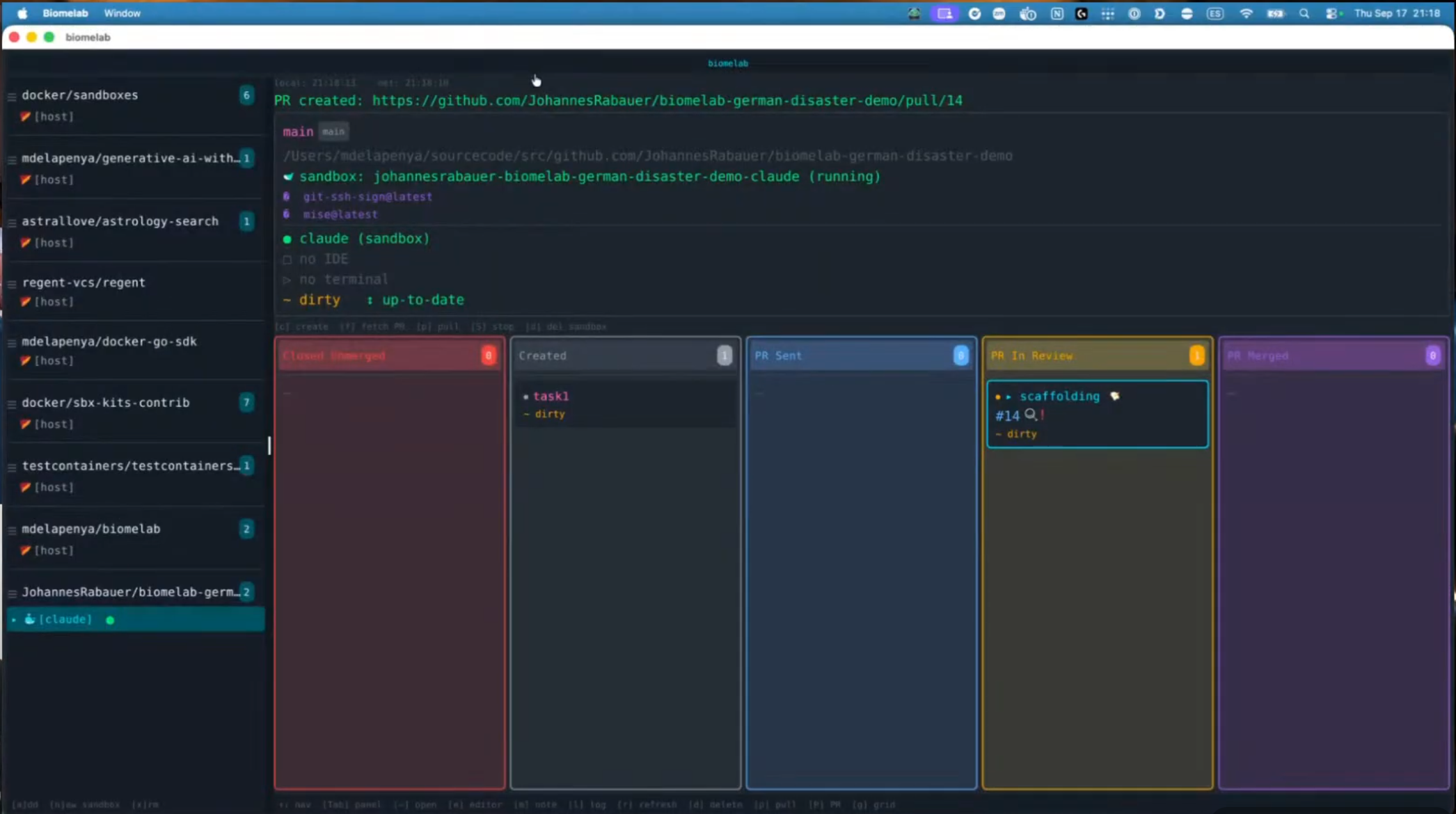
Manuel's problem was simple and familiar: too many terminal tabs, too many VS Code windows, no single place to see which agent was working on what. So he built biomelab, a keyboard-driven dashboard that lists every enrolled project on the left and that project's git worktrees as cards on the right.
The name is literal, and borrowed. Biome was Docker's own internal working title for Docker Sandboxes, Manuel's team, before the product shipped under its official name. He kept it for his own tool: a lab where these small, isolated ecosystems grow, one per agent. It's MIT-licensed, and running it against Docker Sandboxes needs nothing more than a free Docker login.
Main stays untouched
The whole tool is built around one rule. Every task gets its own worktree, created with a single keypress, so nothing ever lands on main by accident.
I never touch main.
That's not a discipline Manuel has to remember. It's structural: main is the big card at the root of the project view, worktrees are everything else, and a kanban board (toggle with g) tracks each one through five states, from created to merged.
One sandbox, not one per worktree
Here's the part I got wrong going in: I assumed each worktree ran in its own isolated microVM. It doesn't. One Docker Sandbox runs per project, and every worktree's agent session lives inside that same sandbox, told apart only by filesystem path.
Manuel's reasoning is practical, not architectural purity: a microVM starts in milliseconds, but running one per worktree at several GB of RAM and tens of GB of disk each doesn't scale on a laptop. The tradeoff is that worktrees aren't strongly isolated from each other, which is part of why he's been exploring regent, a separate tool that records agent conversations on their own git branch, as shared memory between sessions that otherwise can't talk to each other.
What went wrong on stream
It wasn't smooth, and that's the honest part worth saying out loud. biomelab is still at v0.7.0, nowhere near a stable release, so a fair share of what follows just comes with that territory.
Creating the first worktree failed outright: the demo repo had no initial commit yet, so there was no main to branch from (issue #80). Manuel fixed that gap in biomelab itself after the session.
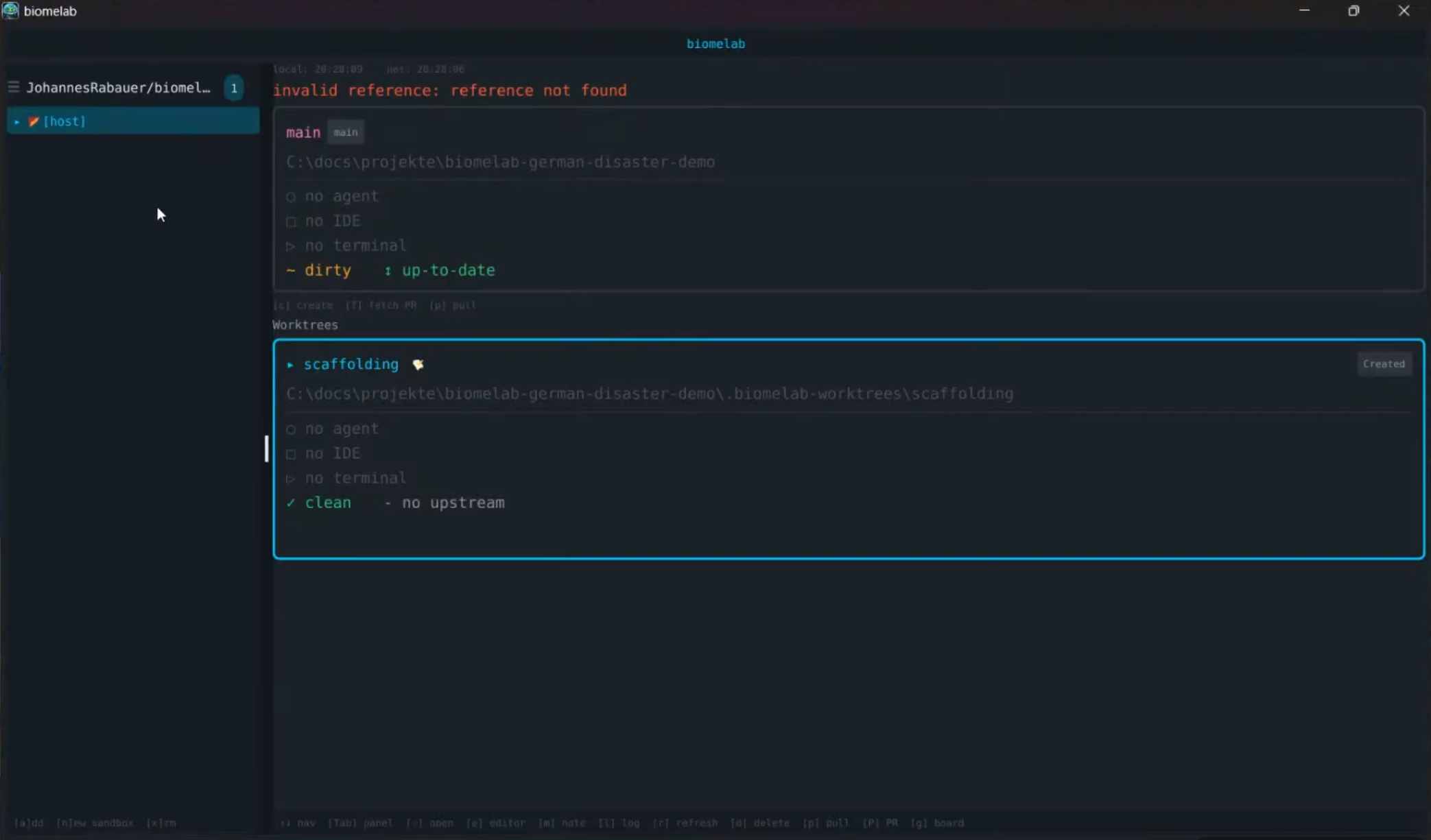
Then, on my machine specifically, opening a worktree's terminal made it pop open and immediately close, over and over, blocking all progress (issue #81). It's a Windows-specific bug in how biomelab tracks terminal focus. It never happened once we switched to Manuel's machine, which is exactly what we did: we abandoned my setup entirely and ran the rest of the session from his screen. I joked on stream that they'd picked the wrong guy to demo this live, and I wasn't wrong. A milder version of the same class of bug still showed up there: pressing enter sometimes opened a fresh terminal instead of refocusing the one already running, a bug Manuel filed live during the stream (issue #84).
Merging isn't wired up yet either: biomelab opens pull requests but can't merge them, so the first PR got merged from GitHub itself rather than from inside the dashboard (issue #83).
Pushing my first pull request failed too, because the sandbox's git remote was set to SSH and I hadn't installed the signing kit for that repo. I just told Claude to switch the remote to HTTPS, and it did, correctly, without me touching a git command by hand.
Three agents, one Java project
Once we were past the rough edges, we registered a small Spring Boot app tracking German disaster events and let it run for real: a scaffolding agent building the app, a second agent drafting a "product owner" skill, then three more agents each working a separate GitHub issue in parallel, all inside the same sandbox.
Docker Sandbox's network policy caught one of them mid-run, blocking an outbound request to Maven Central under its default deny-all rule. What stood out wasn't the block, it was that the agent itself recognized where it was running and asked for the host to approve the request before continuing.
That's perfect, because it has some context of what a sandbox is.
We approved it, the task finished, and the merged pull request's tests passed. Midway through, I floated an idea live: let an agent already running in one worktree tell biomelab to spin up several more, one per issue, instead of a human doing it by hand. Manuel liked it enough to open a GitHub issue for it on the spot, mid-conversation.
Not a collaboration tool
Here's the actual point. GUI tools for managing coding agents already exist, and most AI vendors now ship their own: GitHub Copilot has an app with a similar project list, and other vendors have their own session views. Biomelab's difference is that it doesn't care which harness you run. It's built around the worktree, wired to Docker Sandbox for isolation, and it works whether the agent inside is Claude, Codex, or something else entirely.
What it explicitly isn't is a collaboration tool. It runs on one machine, tracks one person's tasks, and doesn't coordinate across a team. If your work already lives in the cloud, you may not need it, and you may not need Docker Sandbox either. But if you're working locally and want an agent fleet that isn't locked to one vendor's desktop app, this is built for exactly that.
Final thought
If you're willing to experiment a bit and want a light way to orchestrate coding agents locally, this is worth trying. It's open source, and gaps you find (Manuel already fixed one live, mid-recording) are a pull request or an issue away.
One of the things I learned in this AI world is you have to explore. Don't adopt any tool just because someone is promoting it. Explore, experiment, do it yourself, fail, and if what you build to learn the basics doesn't work, use something else.
Useful Links
Comments
Load comments from GitHub optionally
The comment section is provided via Giscus and GitHub Discussions. It will only be loaded after your explicit consent. When loading it, personal data such as your IP address and technical metadata may be transmitted to GitHub, and cookies or similar technologies may be set.
Please confirm first before loading the comment section.