
How Good Is Google's New Antigravity CLI?
with Abdel SghiouarWe built a Java marathon tracking app with Google's new Antigravity CLI — live, with Google's Abdel Sghiouar. Here's what we found.
YouTube
How Good Is Google's New Antigravity CLI?
Load YouTube video
This video is embedded from YouTube and will only be loaded after your consent. When loading it, personal data may be transmitted to YouTube or Google and cookies may be set.
More details are available in the privacy policy.
Project Source
Working Repository
Explore prompts, instructions, and examples used in the live modernization workflow.
Open repositorySession Timeline
- 0:00Introduction
- 3:44History of Google Gemini and Antigravity
- 8:49Preparing Implementation
- 14:00Installing Skills
- 28:03Looking at the Implementation Plan
- 31:45Overwrite Implementation Plan or Add to it?
- 36:30Implementing the plan
- 48:11Agents and Skills
- 51:55Looking at the implementation
- 55:44Looking at the Walkthrough
- 59:40Starting the application - First try
- 1:03:00TDD with AI
- 1:07:50Debugging
- 1:25:00Debugging try: Vaadin Skills
- 1:40:10Debugging try: Update to Vaadin 25
- 2:02:40Debugging try: Change Quarkus to Spring Boot
- 2:10:10Conference Talk
- 2:22:46Conclusion
We wanted to evaluate Google's new Antigravity CLI on something real, not a toy example. So Abdel and I built a Java marathon tracking app: GPX file imports, interactive route maps via OpenStreetMap, and pace, speed, and elevation charts — all using Quarkus, Vaadin, and Antigravity CLI. Here is what we found.

What Is Antigravity CLI?
Antigravity CLI is a complete rewrite of Gemini CLI — same concept, new language. Where Gemini CLI was written in TypeScript, Antigravity is written in Go. Despite the name change and the rewrite, it feels immediately familiar: shortcuts, commands, and core behaviors carry over from other AI coding CLIs. For anyone who has used similar tools before, the learning curve is low.
Skills, Agents, and Tasks
Antigravity CLI supports three extension points: skills, agents, and tasks. Skills teach the model domain-specific knowledge. Agents add specialized behavior. Tasks define units of work.
If you are working on a Java or JVM project, two repositories are worth knowing:
- agent-skills — a community collection of reusable skills
- jvm-skills — skills specifically for the JVM ecosystem
How It Structures Work: Plans, Tasks, Walkthroughs
Before writing any code, Antigravity CLI produces an implementation plan. You can read it, edit it, and choose whether to extend an existing plan or replace it. That decision point is genuinely useful — it gives you a natural moment to course-correct before the agent commits to a direction.
As work progresses, it maintains a visible task list showing what has been completed. We noticed a few minor display bugs in that view, but nothing that blocked the workflow. When a batch of work is done, the tool writes a walkthrough summarizing what it did. That structure makes the process more transparent than most other tools in this space.
Permissions and the Sandbox
Like other AI coding agents, Antigravity CLI asks for permission before touching the filesystem or running commands. You can approve individually, deny, or switch to "yolo mode" to allow everything without prompts.
One standout feature: you can configure the client to run inside a sandbox, set directly in the settings file. It's a solid idea for keeping the agent's side effects contained and predictable. Unfortunately, the sandbox did not work during our session — it appears to still need some work. Worth watching in future releases.
Only Google AI Models
Only Google AI models are available. That is expected for a Google product, but worth noting for teams already invested in other model providers.
The Debug Marathon
We set out to build and run the app. We never got there.
After the initial implementation was generated, we hit a runtime issue. The rest of the session was three debugging attempts, none of them successful:
- We installed the Vaadin skills for Claude to give the model better Vaadin knowledge. No fix.
- We upgraded Vaadin from version 24 to 25. The app used vaadin-maps-leaflet-flow for the map and vaadin-chartjs-wrapper for the charts. No fix.
- We migrated the backend from Quarkus to Spring Boot, hoping a different framework would resolve the issue. No fix.
The app never ran. That is an honest result, and it is worth reporting as one.
Off the Clock
We took some time off-topic as well. Abdel shared his marathon running background — fitting, given the app we were building — and we talked about upcoming Java conferences and our respective talks and presentations.
Update: It Works
After the stream, I spent a few more minutes prompting — and the app finally ran.
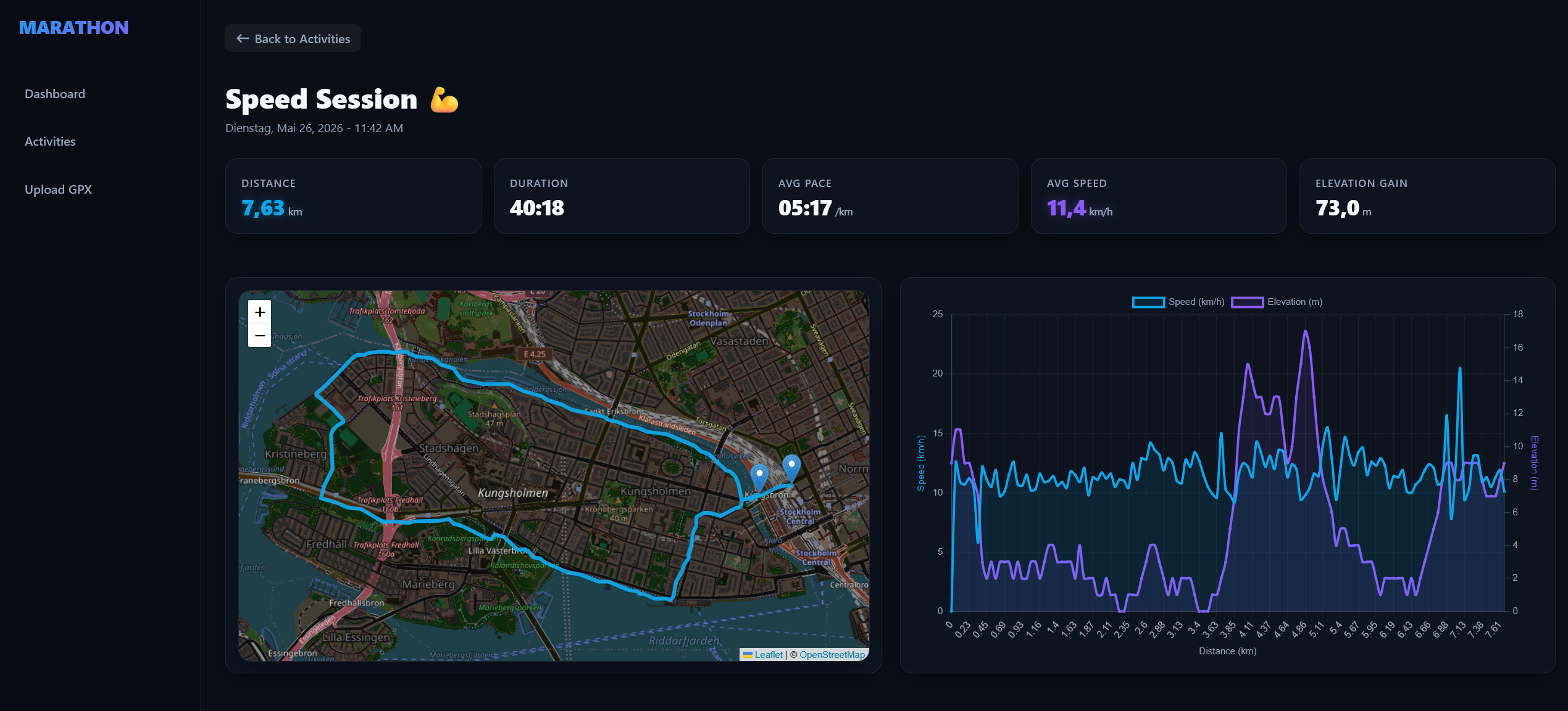
If you want to see the result, check out the antigravity-marathon-demo repository.
Verdict
Antigravity CLI is a solid entry into the AI coding CLI space. It feels familiar from the first session, the planning and walkthrough features add genuine structure to the workflow, and the sandbox idea shows thoughtful design thinking. The rough edges are real: task tracking has minor display bugs, the sandbox did not work, and we could not get the demo app to run. But none of those are structural problems; they are the kind of thing a young tool works through. It is worth keeping an eye on.
Links
Comments
Load comments from GitHub optionally
The comment section is provided via Giscus and GitHub Discussions. It will only be loaded after your explicit consent. When loading it, personal data such as your IP address and technical metadata may be transmitted to GitHub, and cookies or similar technologies may be set.
Please confirm first before loading the comment section.