
Live Vibe Coding Battle: Build a Java App with GitHub Copilot
with Catherine EdelveisTwo predefined prompts, one shared Java app, and strict CI gates: the one-shot version started but failed when retrieving results, while the split-prompt workflow produced the more stable app and better quality metrics.
Project Source
Explore prompts, instructions, and examples used in the live modernization workflow.
Open Working RepositorySession Timeline
- 00:00Intro-Placeholder
- 00:35Introduction
- 03:41Explaining the experiment
- 20:58Catherine starting with the Single-Shot-Prompt
- 30:18Johannes starting with the Iterative Prompt (Database + Domain Layer)
- 51:30Quick recap
- 55:30Prompt No.2 for the Iterative Prompt (OpenAI Integration)
- 01:12:00Prompt No.3 for the Iterative Prompt (REST API Layer)
- 01:20:10Check results: Single-Shot-Prompt
- 01:27:00Prompt No.3 takes a while...
- 01:30:30Running App: Single-Shot-Prompt
- 01:56:00Check results: Iterative Prompt
- 02:03:00Running App: Interactive-Prompt
- 02:13:30Running App: Iterative Prompt
This stream was a simple but useful experiment: Catherine used the predefined master prompt in one shot, I used the predefined split prompt in six smaller steps, and we compared the outcomes against the same CI gates at the end. The app itself was a small healthcare assistant for symptom analysis, AI-generated advice, and specialist lookup.

Setup of the Battle
The repo already came with a strict evaluation pipeline, so this was never about generating code quickly. It was about generating code that can hold up under pressure.
Quality gates used in the stream:
- Apache Maven PMD Plugin to catch code style problems, duplication, and common maintainability issues.
- SpotBugs Maven Plugin to detect likely defects such as null handling issues, bad API usage, and risky implementation patterns.
- JaCoCo Maven Plugin to measure test coverage and show how much of the generated code was actually exercised.
- Trivy to scan the project for known vulnerabilities in dependencies and build artifacts.
- OWASP ZAP Baseline Scan to run a lightweight dynamic security check against the running application.
That setup made the session useful because Copilot output was judged by objective checks, not by first impressions.
Results from the Live Stream
GitHub Action results of One-Shot Prompt and Split Prompt.
| Tool / Metric | One-Shot | Split Prompt |
|---|---|---|
| JaCoCo Coverage | 11% | 32% |
| PMD Violations | 1 | 0 |
| SpotBugs Total Bugs | 26 | 17 |
| Trivy Vulnerabilities | 3 | 3 |
| ZAP Medium | 2 | 2 |
| ZAP Low | 6 | 6 |
The main result was clear:
- the one-shot master prompt did produce a running application, but retrieving results failed due to internal errors
- the split-prompt approach did produce a running application
- static analysis and test-related outcomes were strongly in favor of split prompts
Important context: this was not a failure caused by Catherine. The key issue was prompt complexity. The master prompt tried to do too much in one shot, which made debugging and correction harder.
Quick Comparison: Master Prompt vs Split Prompt
Here is the practical difference between the two approaches we used.
| Dimension | Master prompt (one-shot) | Split prompts (6 steps) |
|---|---|---|
| Scope per generation | Entire app in one go (DB, OpenAI services, REST API, Vaadin UI, tests, JMeter, Docker) | One layer at a time (domain, AI services, API, UI, tests, performance/docker) |
| Feedback loop | Late and wide: failures appear after many coupled changes | Early and local: each step can be built and validated before continuing |
| Debugging effort | High, because root causes are mixed across layers | Lower, because regressions are isolated to the current step |
| Architectural control | Weaker: more room for accidental cross-layer coupling | Stronger: clearer boundaries and staged integration |
| Session outcome | App started, but key result retrieval failed with internal errors | Reached a running app with result flow working and better quality-gate metrics |
The short version: the master prompt optimized for one-pass completeness, while the split prompts optimized for incremental correctness.
UI Outcome (Unexpected)
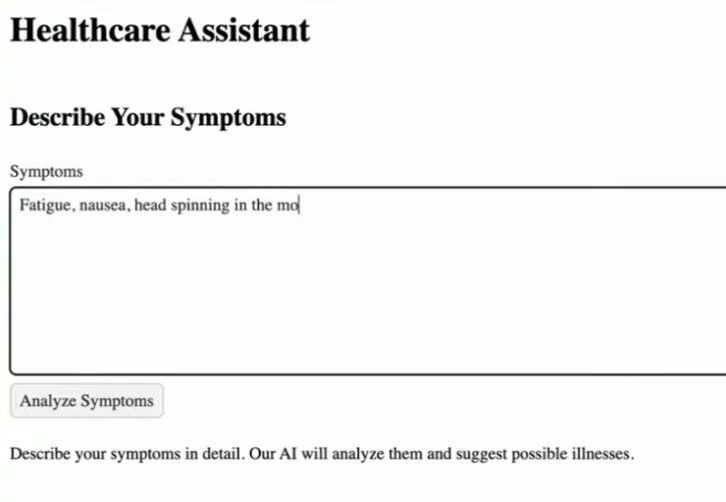
One surprising part of the stream was UI quality: both generated applications looked rough, even though we used Vaadin and Vaadin usually has solid default styling. We could not fully explain during the session why both UIs looked that bad.
What Actually Worked Better
The split-prompt workflow changed two things that mattered most:
- each step could be validated immediately
- we could understand and review what the model changed before moving on
That gave better control over architecture and made it easier to correct Copilot when it produced confident but wrong output.
That is why the split approach was easier to steer and easier to trust.
Why the Quality Gates Mattered
Without automated checks, this stream could have looked like both approaches were "kind of fine" for a while.
The CI gates made the differences visible:
- code quality issues were surfaced quickly by PMD and SpotBugs
- security and analysis checks prevented silent regressions with Trivy and OWASP ZAP Baseline
- we could compare prompting styles using measurable feedback
This is exactly where vibe coding gets real: if the code cannot pass your guardrails, it is not done.
Practical Takeaways
- avoid oversized one-shot prompts for multi-layer Java apps
- break work into smaller prompts with clear acceptance criteria
- run static analysis and tests after each meaningful step
- treat AI output as a draft that must be reviewed, not trusted
- optimize for explainability during development, not only for speed
Helpful Links
Final Thought
This session was a good reminder that better prompting is not about writing a longer prompt. It is about building a workflow where each step is small enough to validate.
The one-shot master prompt got the app running but still failed on internal result retrieval. The split-prompt strategy delivered the more stable end-to-end flow and better quality signals. For production-minded Java teams, that is the stronger default.